To add service descriptions to Google Business Profile, open each service again after adding it and fill in the hidden description box. If you've already created services, you can go back and edit them today. IvI SEO rewrote them for a York electrician on 5 June 2026, which coincided with its top-3 Google Maps points in Wigginton doubling from 13 to 26 of 35 by September, while its website gained matching service pages.
In Clifton, the electrician's profile went from nowhere to the top 3 at 29 of 30 points by September.
Can you add a description to Google Business Profile services?
Yes, you can add a description to every service on a Google Business Profile, but the box only appears when you click back into a service after creating it. Setting a service up only asks for its name and a price. To find the box, go to Edit services and select the service. The description can be up to 300 characters. That box is a free place to explain the job properly, include the keyword you want to show up for, and add a call to action.
- Open your profile. Sign in to the Google account that manages your Google Business Profile, then search your business name on Google to bring up the profile's editing options.
- Go to Edit services. On your Google Business Profile, select Edit services to see the services you've already added, or add a new one.
- Click back into the service. The description box for a Google Business Profile service only appears when you select a service that's already been created.
- Write it and save. Type up to 300 characters into the Google Business Profile service's description box, then save it.
Here's how it usually goes. You add "Emergency Electrician", pop a price in and save. Boom, keyword in the service name. Job done, you'd think. Nothing on that screen tells you there's more.
Your competitors have done exactly the same, so you're level, not ahead or behind. In IvI SEO's audits, most profiles stop right there and leave the description blank, because nobody knows it's there.
The bit almost nobody knows: click back into that service (and any you've already made) and there it is. A description box. That's where you explain the job properly, and it's a natural place for your keyword. So, does filling it in actually make a difference?
Does adding keywords to Google Business Profile service descriptions improve rankings?
Yes, adding keywords to Google Business Profile service descriptions can improve rankings, because they help Google match the profile to more specific searches. In an IvI SEO test on a York electrician's profile, doing so coincided with map pack coverage doubling between June and September 2026, while the business's website gained matching service pages over the same months.
The Emergency Electrician description, which names Wigginton among its service areas, was rewritten on 5 June 2026, with no other profile changes apart from two new reviews. By September, the profile appeared in the top 3 for "emergency electrician wigginton" at 26 of 35 points on a local rank grid, up from 13. Before the change, it missed the top 20 at 12 of those points. Afterwards, it ranked in the top 4 at every one. Google's performance report showed searches up 221% and profile views up 98% in August compared with July, both during the test.
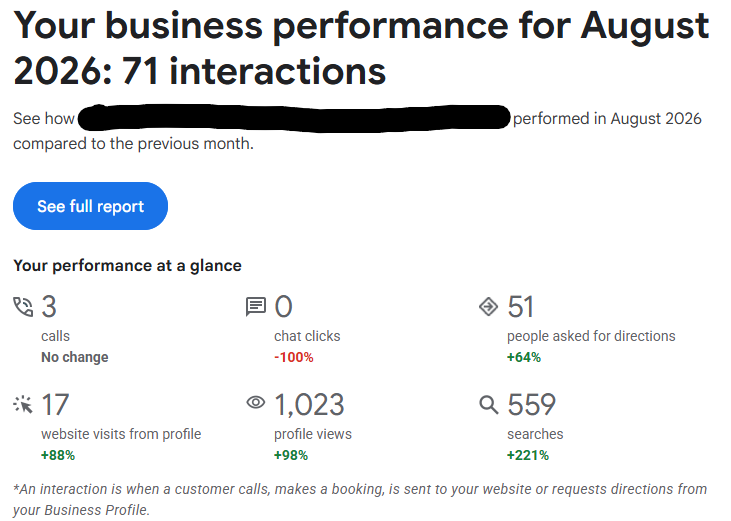
Calls straight from the profile didn't move: 3, same as July. But website visits from the profile were up 88%. People are clicking through to have a proper look at the business before they get in touch, and that's still a win.
And the site is doing its job once they land. Since tracking started on 24 July, it's logged 19 leads, 9 WhatsApp clicks, 4 email clicks and 2 phone calls.
In June, this is what went into the Emergency Electrician service:
Emergency electrician in York for urgent power loss, tripping consumer units, dead sockets, unsafe wiring, sparks or burning smells. Available in York, Haxby, Wigginton, Rawcliffe, Huntington and Clifton.
Nothing clever. The keyword, the problems people actually ring an emergency electrician about, and the areas covered.
Quick explainer if you haven't seen one of these: a rank grid checks where a business shows on Google Maps from lots of points across an area. Green is good. Red is "you don't exist". Numbers = rank in the map pack.
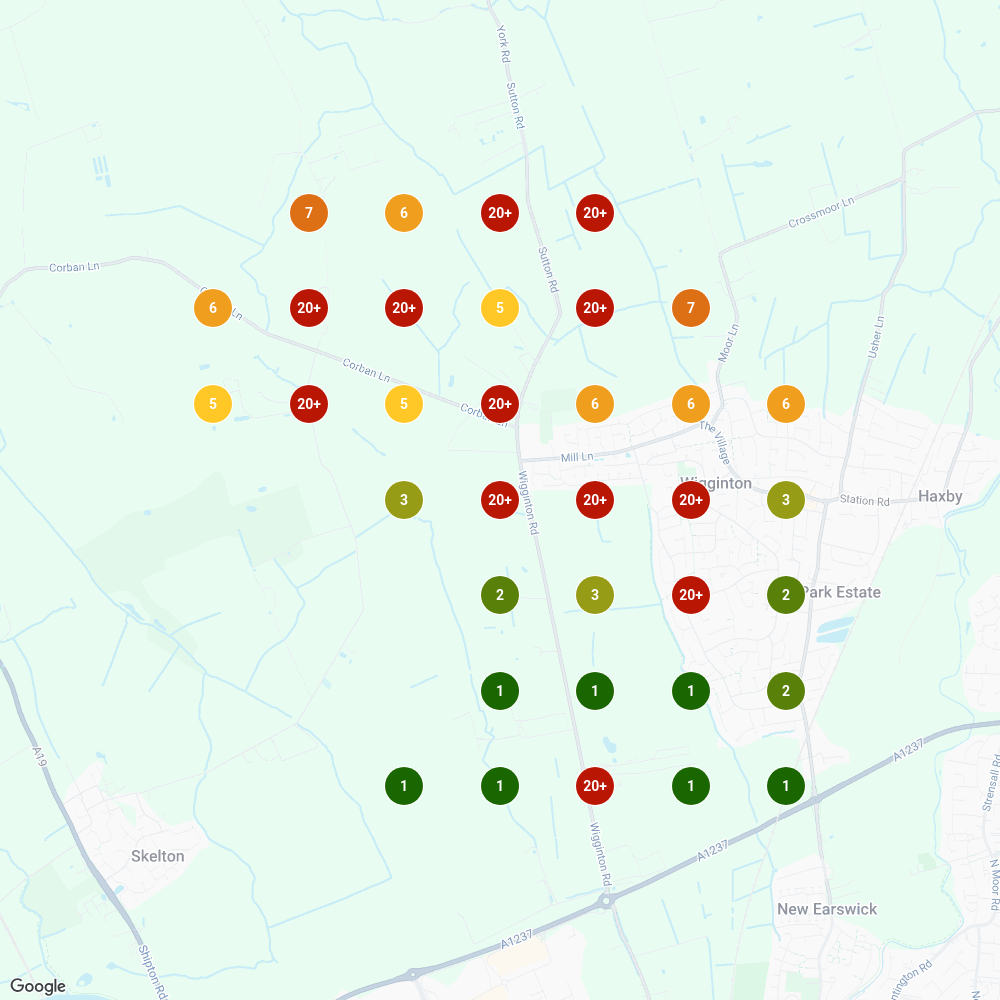
That's June. Red everywhere north of Mill Lane. If you needed an emergency electrician and lived there, this business wasn't in the conversation.
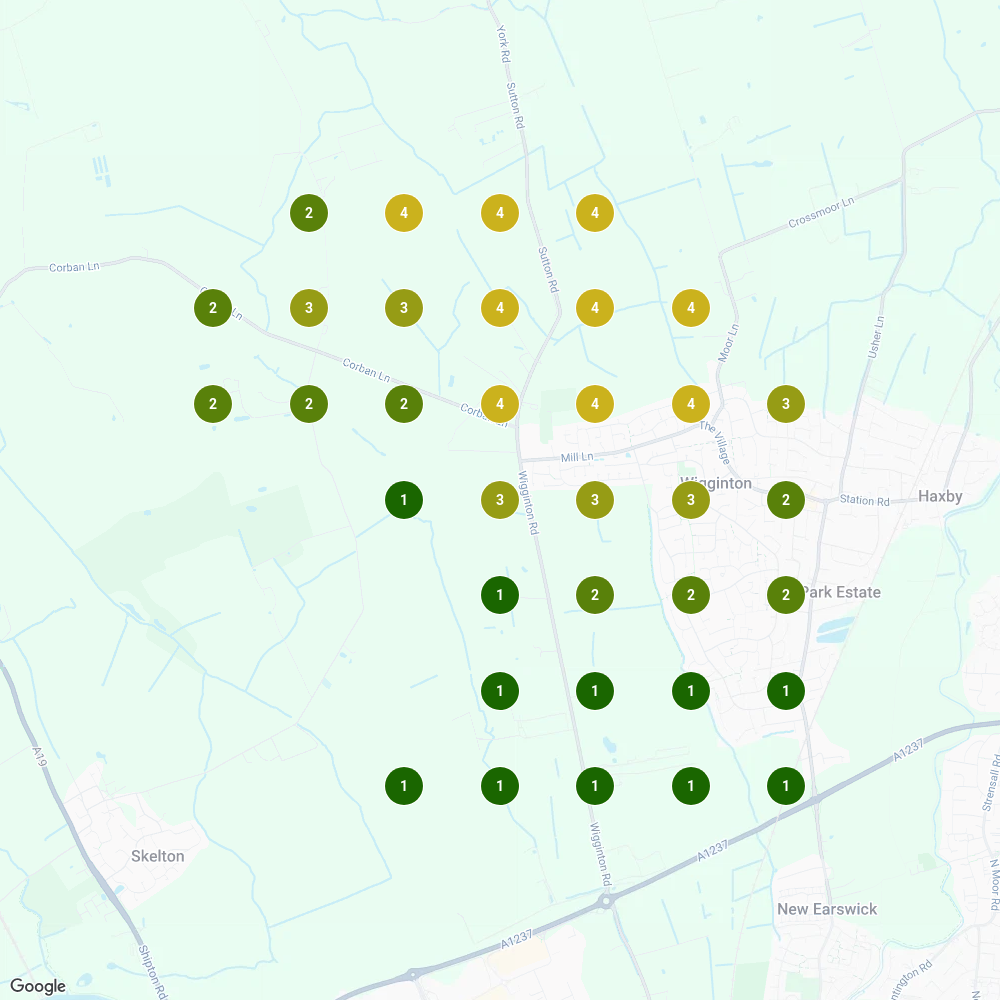
That's September. No reds. It's top 3 across most of the area and never lower than 4th.
Is it perfect? No. The north-west is still sitting at 3s and 4s, so there's more to do. And it's one keyword on one profile, so I'm not claiming the descriptions did every bit of the work. Nothing else on the profile changed between June and September, apart from two new reviews, and that's what I'd expect: more people seeing the profile means more jobs, and more jobs means more reviews. The website did change, though: it got a full set of service pages over the same months. That's exactly what you want. In my experience, Google looks at your website and your wider reputation, not just your profile, and a profile and site that describe the same services back each other up. That's why I always do this on every Google Business Profile I work on.
Want every scan, the method and the bits that didn't improve? Here's the full test.
What should a Google Business Profile service description say?
A Google Business Profile service description should say what the service is, what it fixes and where you offer it, all within the 300-character limit. Specifically, it should name the service with its main keyword, list the problems customers need it for and say which areas you cover. If there's room left, add a reason to trust you and a call to action. To add one, open your profile, select Edit services, choose the service and write in the description box. Use the keyword the way a customer would search for it, and only list areas you genuinely cover. IvI SEO builds every description from the service, the problems and the areas: for a York electrician's Emergency Electrician service, all three fitted into 204 of the 300 characters.
Here's the one from the test again:
Emergency electrician in York for urgent power loss, tripping consumer units, dead sockets, unsafe wiring, sparks or burning smells. Available in York, Haxby, Wigginton, Rawcliffe, Huntington and Clifton.
Breaking it down:
- The service and keyword. "Emergency electrician in York."
- The problems. Power loss, tripping consumer units, burning smells. That's how people describe it when they're panicking at 11pm. Nobody searches "emergency electrical services provider".
- The areas. Six places the electrician actually covers, Wigginton included.
One service description, broken down
Emergency electrician in York for urgent power loss, tripping consumer units, dead sockets, unsafe wiring, sparks or burning smells. Available in York, Haxby, Wigginton, Rawcliffe, Huntington and Clifton.
- 1 Service + keyword29 characters
- 2 Problems customers describe103 characters
- 3 Areas you cover72 characters
Use the spare for why you (a qualification, a guarantee) and what to do next
That's 204 characters, so there's still about 100 spare. I'd use them for:
- Why you. A qualification, years in the trade, a guarantee. Whatever's true.
- What to do next. "Call now for same-day help." If someone's clicked into your service, they're interested. Don't leave them hanging.
Then do it for every service. Not just the one you care about most. All of them.
What should you avoid in Google Business Profile service descriptions?
In Google Business Profile service descriptions, avoid keyword stuffing, listing towns you don't cover and describing services you don't offer. A stuffed description reads badly to the person deciding whether to call you, and Google Business Profile information must reflect your business accurately. Also avoid vague filler like "professional, reliable service" with nothing after it. Trust words work when something specific backs them up, such as a qualification, a guarantee or years in the trade.
IvI SEO's rule is one keyword per description, written the way a customer would say it. This is what stuffing looks like:
Emergency electrician Wigginton, electrician Wigginton, best electrician Wigginton, cheap electrician Haxby, electrician near me…
You'd hope nobody writes that. People do. Would you call them? Exactly. Keywords do belong on a profile, just in the right places: where keywords actually help in a Google Business Profile.
On towns: if you don't go to Leeds, don't put Leeds in. You'll get calls you have to turn down, and that helps nobody.
And "professional, reliable service"? Every electrician on the map says that. It's like writing "I have hands" on your CV. Tell them why you're reliable.
Want this done for you?
Writing service descriptions is one of the first things I do on every profile as part of IvI SEO's local SEO service. The descriptions, the grid tracking, the lot. If your map pack looks more red than green, take a look at how I can help. I'll tell you honestly what I'd fix first.