IvI SEO's free Google Maps rank checker runs live Google Maps searches from 9 points across your town to show where you appear. Check your Google Maps rankings with a rank grid, which searches your keyword from points across your area, because results change with the searcher's location. That applies to Google Maps and the map pack in the UK as of October 2026. Read the grid, then scan again with exactly the same settings so the maps can be compared.
Here's the whole job, start to finish, in the order the checker takes you through it.
- Pick the service and your town. Choose one service, the way customers would type it, with no town in it. Then add the town or city where you want customers to find you.
- Run the free check. Paste your Google Business Profile share link (on Google Maps, open your business, tap Share, then Copy link). No link to hand? Search by what you do and your town instead.
- Read the map. Green means you're in the top 3. Red means customers can't find you. Count the points in the top 3 first, then the points outside the top 20.
- See the whole town with the full report. It's £29, one-off: a pin about every half mile across your town (up to 121 for big cities) and the 5 businesses beating you.
- Scan again the same way. Keep the same service and the same town every time. The full report includes a free re-scan after 30 days, so you can see what's moved.
Already paying for a rank grid tool such as Local Falcon? The sections below cover setting your own grid.
Why doesn't searching on your own phone show your Google Maps ranking?
Searching on your own phone shows your Google Maps ranking at one spot only, because Google uses your current location to pick the results. That location can come from the device itself, its IP address, saved home or work addresses and past searches. A customer a few streets away or in the next town can see the results in a different order, because distance from the searcher is one of Google's three local ranking factors. A search on your own phone is one reading from one place, not your Google Maps ranking across the area.
- Where you are. Google's Search Help on location says many devices, phones included, "can work out their precise location", and that IP addresses are "roughly based on geography", so google.com may get some information about your general area.
- Past searches and saved addresses. A home or work address you've set with Google may be used to estimate your location when it's likely you're there, and in some cases so may areas you've searched for before. An owner checking rankings from their own desk is probably sitting at the very address they've saved.
- Incognito in Chrome. Chrome's Incognito mode can help keep your browsing private on your device, but Google's Chrome Help on Incognito is clear that "it doesn't make you invisible".
- The Performance report. Your Google Business Profile Performance report shows views, interactions and the search terms people used to find your business, not a ranking position.
As for distance, it's the factor a business can do least about, and how Google ranks local businesses covers why.
So if your own phone puts you first, enjoy it, then check from where your customers are.
Which keywords should you check your Google Maps ranking for?
The keywords to check your Google Maps ranking for are usually a service-plus-town search for each service you want calls for, plus a "near me" search. Type each keyword the way customers search it, the service and the town or area, not trade shorthand. A "near me" search belongs on the list because it names no town, so the searcher's location decides the results. Check each keyword on a rank grid, a map showing where you rank from points across the area. On one IvI SEO grid around Wigginton on 2 June 2026, a York electrician was in the top 3 at 13 of 35 points for "emergency electrician wigginton" and at none for "house rewire wigginton".
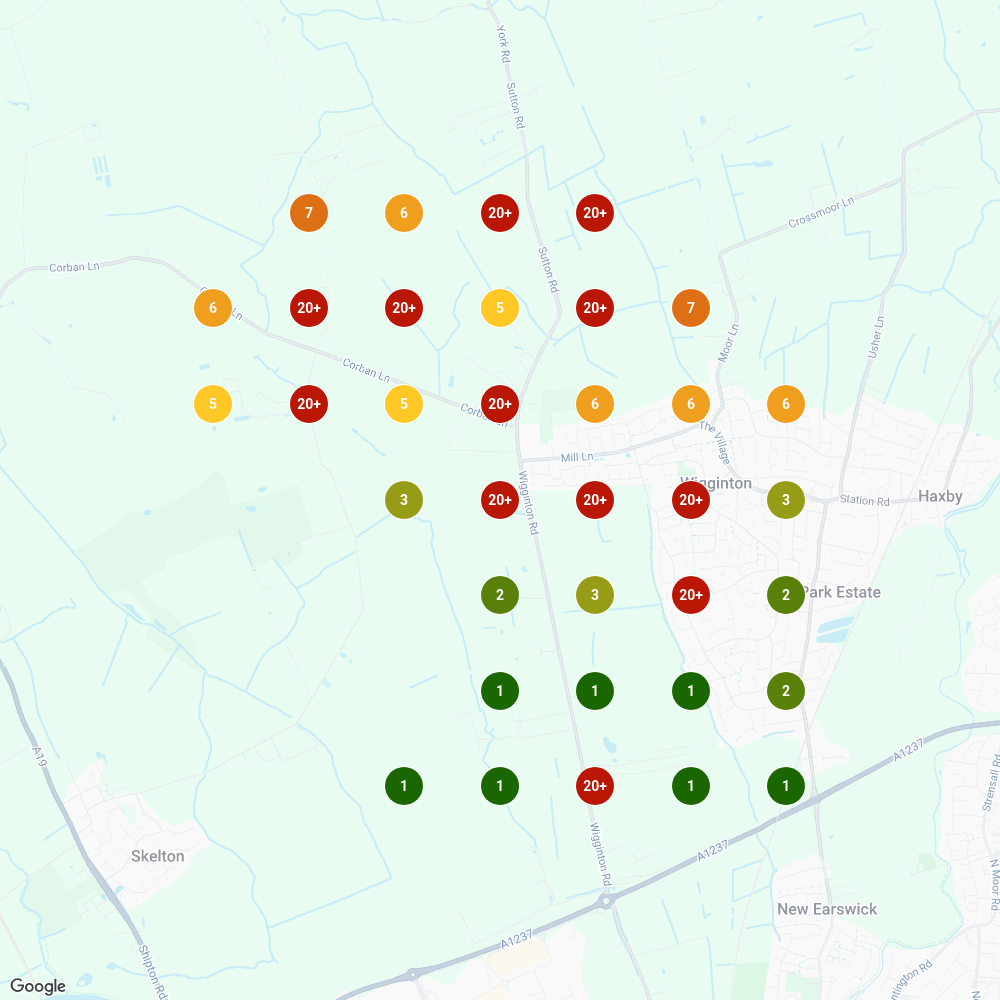
Here are the three Wigginton searches from that 2 June 2026 grid, a 7×7 grid reaching 1 mile from its centre in Wigginton.
| Keyword | Points in the top 3 | Points outside the top 20 |
|---|---|---|
| emergency electrician wigginton | 13 of 35 | 12 |
| electrician wigginton | 9 of 35 | 0 |
| house rewire wigginton | 0 of 35 | 31 |
The general search never dropped out of the top 20. The rewire search was missing at 31 of the 35 points. Same business, same streets, same day. Those three scans were among 63 Local Falcon scans IvI SEO ran for a York electrician across 19 keywords in York and five nearby areas.
What a grid can't tell you is why three searches came out so differently. It's one grid on one day, not a rule that service searches do worse than general ones.
Build your own list the same way. Say you're a plumber in Harrogate after boiler repairs, emergency call-outs and new bathrooms (a made-up example): you'd check "boiler repair harrogate", "emergency plumber harrogate", "bathroom fitter harrogate" and "plumber near me".
Four keywords, four maps.
What grid size and spacing should you use for a Google Maps rank grid?
A sensible grid size and spacing for a Google Maps rank grid is usually 7×7 points spread evenly across the area you want customers from. How far the grid reaches from its centre is a scan setting, not how far your business can show on Google Maps. Keep the grid size, how far it reaches and the centre identical every time you scan, because changing any one of them gives a different map. IvI SEO's two different grids for "electrician haxby" on 2 June 2026 gave a share of local voice, the percentage of points in the top 3, of 25% on one and 33% on the other.
- Centre it on the area you want customers from. A rank grid's middle point goes on the town or area you're checking, which is why the York electrician's 7×7 grids for village searches each sat on that village, while the 9×9 grids reaching 5 miles from their centres sat over York.
- Keep every setting identical. The temptation with a rank grid is to go bigger once you've got the hang of it, but a new grid size starts a new set of maps instead of adding to the old one.
- Why a change breaks the comparison. A rank grid with a different size, reach or centre searches from different spots, so its counts and percentages stop meaning the same thing.
- What the York grids used. The York electrician's grids ran from 5×5 to 11×11, and its 7×7 grids reached 0.3, 0.6, 0.8 and 1.0 mile from their centres, so their points sat about a tenth to a third of a mile apart.
- The Haxby detail. Both "electrician haxby" grids on 2 June 2026 were 9×9, but they differed in centre and reach: one reached 0.7 mile from a centre near Haxby and Wigginton, with points about 0.18 mile apart, and the other reached 5 miles from a centre in York, with points 1.25 miles apart.
Local Falcon labels the reach setting Radius. It's how far the grid reaches from its centre, not how far a business can rank.
Here's the cost when grids aren't repeated exactly. Only 6 of the York grids, covering 5 of the 19 keywords, could be compared from June to September, because only those were repeated with identical settings. The York case study leaves the rest out rather than stretch them to fit.
Run the scan, and you've got a map full of coloured numbers.
What do the numbers on a Google Maps rank grid mean?
The numbers on a Google Maps rank grid show where your business ranks at each point on the map. A point outside the top 20 means the business doesn't appear at all when someone searches from that spot. A point in the top 3 means the business is in the map pack, the three results people actually see. Each rank grid covers one keyword on one day. When IvI SEO scanned "emergency electrician clifton" on the same 7×7 grid, a York electrician was in the top 3 at 0 of 30 points on 2 June 2026 and at 29 of 30 on 22 September 2026.
- Points in the top 3. Points in the top 3 is the number of grid points where the business shows in the map pack, and it's the number to read first.
- Points outside the top 20. Points outside the top 20 is the number of grid points where the business doesn't appear at all, and if that's every point for every keyword you check, start with why a Google Maps listing might not show up.
- Average rank. Average rank is Local Falcon's average position across every point, with "not found" counted as 21, so lower is better and 21.00 means the business didn't show anywhere on the grid.
- Share of local voice. Share of local voice on a rank grid is the percentage of points in the top 3, not the marketing "share of voice" about brand mentions and ads.
- The colours. Each point on a rank grid map is coloured and numbered. Green is good. Red is "you don't exist". Numbers = rank in the map pack.
- The drop-off. The drop-off on a rank grid is where the reds start, the edge where the business stops showing, and on the June Wigginton grid below, that meant "Red everywhere north of Mill Lane". For what to fix, start with common Google Business Profile mistakes.
Now one search read twice, "emergency electrician clifton":
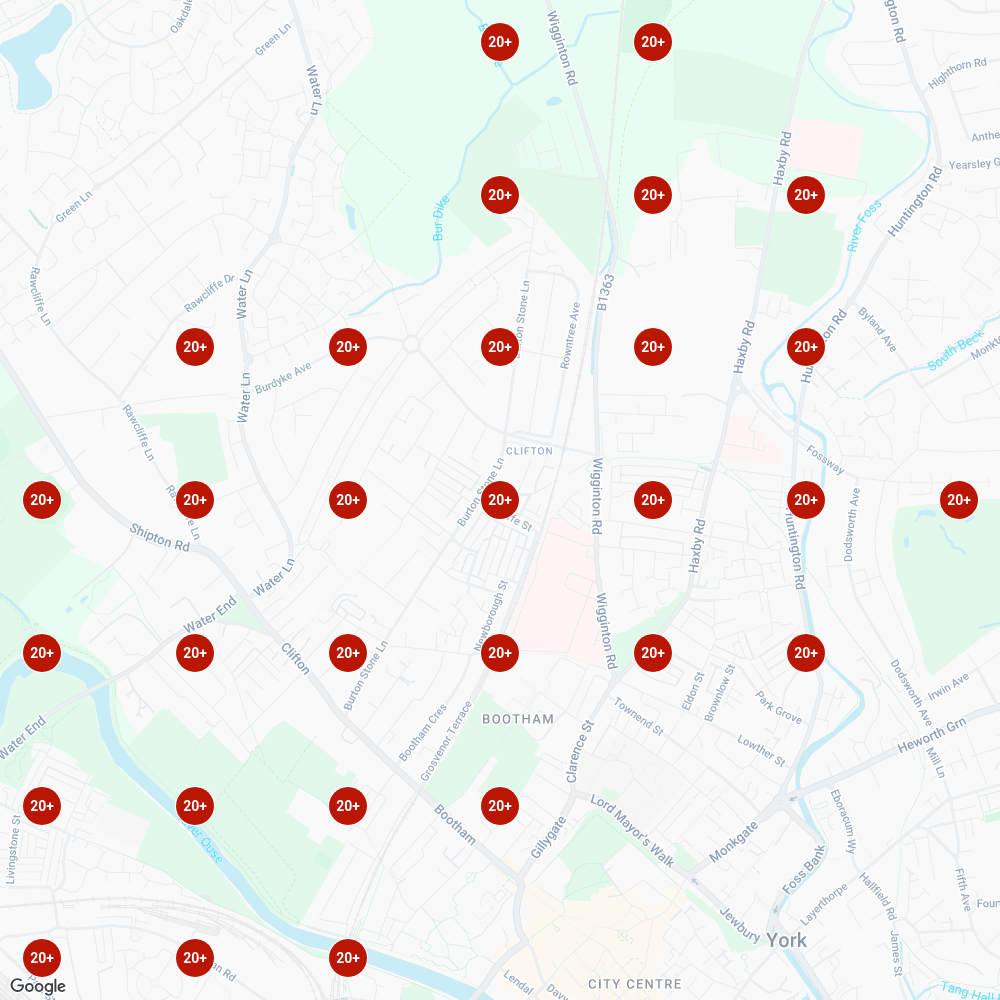
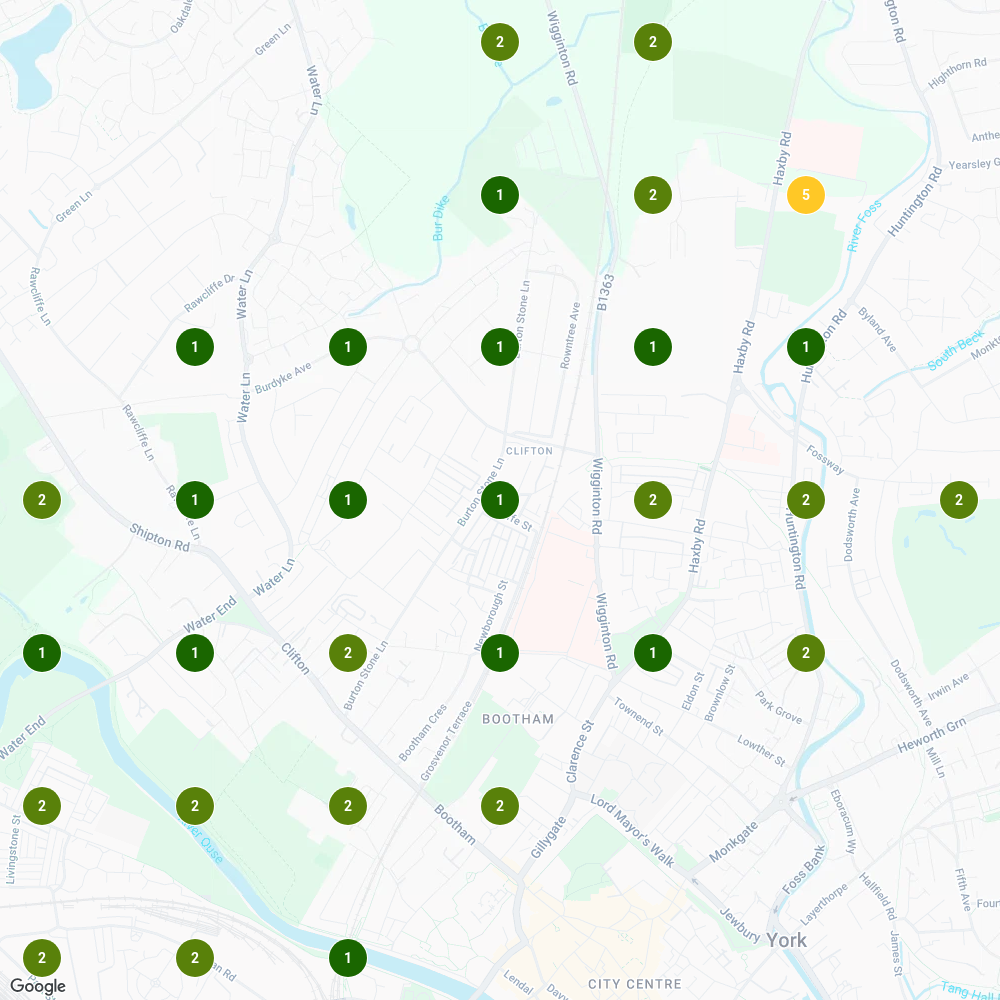
On 2 June 2026 the whole grid was red: outside the top 20 at all 30 points, an average rank of 21.00 and a share of local voice of 0%. By 22 September 2026, on the same 7×7 grid reaching 0.8 mile from its centre, the business was first at 14 of the 30 points, with an average rank of 1.63 and a share of local voice of 97%.
The grid doesn't say why. That result coincided with the change the case study tracks: rewritten Google Business Profile service descriptions on 5 June 2026, alongside new website service pages.
Is 97% good? I'd take it. But it's one keyword on one profile, and no fixed score is good for every business.
Scan again a fortnight later, though, and don't expect the same numbers.
Why do Google Maps rankings change from one scan to the next?
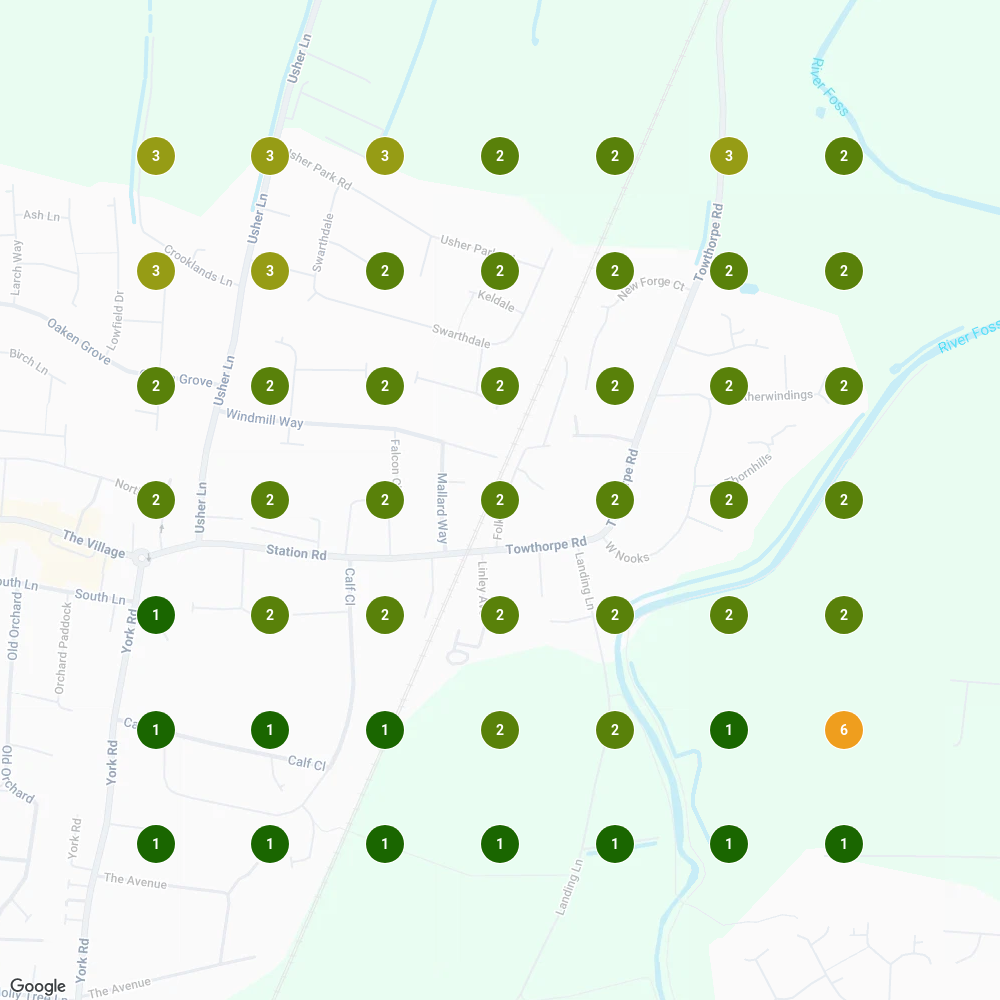
Google Maps rankings can change from one scan to the next even when you change nothing, because your rank also depends on the businesses you're up against. Only compare rank grid scans where the keyword, the grid size, how far the grid reaches and the centre all match. Judge the direction over several scans, not one, because each rank grid is a snapshot of one day. Across two IvI SEO scans of "emergency electrician haxby" on the same 7×7 grid on 8 and 22 September 2026, with nothing changed in between, a York electrician went from 48 to 47 points in the top 3, while the points where it ranked first fell from 12 to 4.
- Early scans are early. Scans taken days after a change are early readings: on 9 June 2026, four days after the case study's 5 June change, three of the four Wigginton grids moved up and the fourth, "electrician near me", got worse, with its average rank going from 10.80 to 12.74. Keep readings that early apart from the after scans.
- Compare like with like. A rank grid comparison starts with the settings, not the numbers: check that the keyword, grid size, reach and centre all match before you read a single figure, and treat a mismatched pair as two separate maps.
- One scan isn't a trend. A single rank grid can mislead either way: had anything been changed between the 8 and 22 September 2026 scans of "emergency electrician haxby", it would have got the blame for the drop in first place, which happened with nothing changed at all. The York case study puts it simply: grids wobble week to week.
- How often to scan. I'd run each rank grid once a month, on the same settings every time.
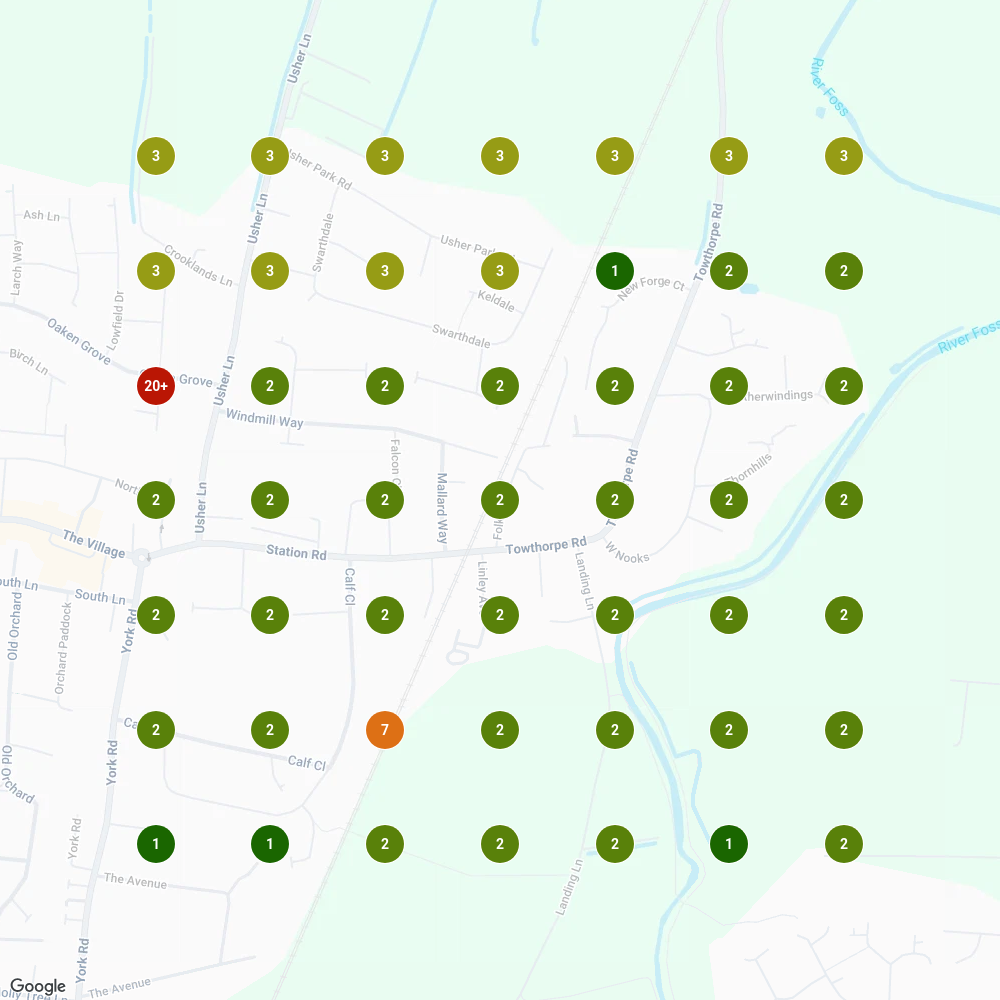
Here are the two "emergency electrician haxby" grids, 8 September 2026 first, then 22 September 2026:
One scan is the weather. A run of them is the climate.
Who should run your rank grids?
You can run your rank grids yourself or get help, as long as every scan keeps the same keyword and settings. Running and reading rank grids, the maps that show where a business ranks across its area, is part of IvI SEO's local SEO service. Neither route moves a ranking on its own, because a rank grid only measures where you stand.
If you do it yourself, there are three ways in: the free check in IvI SEO's rank checker, which covers 9 points across your town; the free spot check from your phone, which shows one spot at a time; or a paid rank grid tool, which shows the whole area. Any of them works if you keep checking the same way, and for the spot check that means the same searches from the same places. (Somewhere, a sales coach is wincing at all this free advice.)
If you'd rather hand it over, running and reading the grids comes with the rest of the profile work I do for clients. Here's how I work with local businesses.
Either way, don't let your own phone be the only judge.